After modernizing my personal website to Astro and TypeScript, I wanted to find a way to make it more engaging for returning visitors. Specifically, I wanted to highlight newly published content (such as blog posts, projects, courses, publications, and visualizations) that a user has not seen yet.
However, since this website is fully static and hosted on GitHub Pages, there is no server-side database or user authentication to track read states. Everything has to happen client-side.
This post details how we built a type-safe, client-side unread content tracking system that resolves the classic user experience challenge of asynchronous state loading: the visual flicker (Layout Shift).
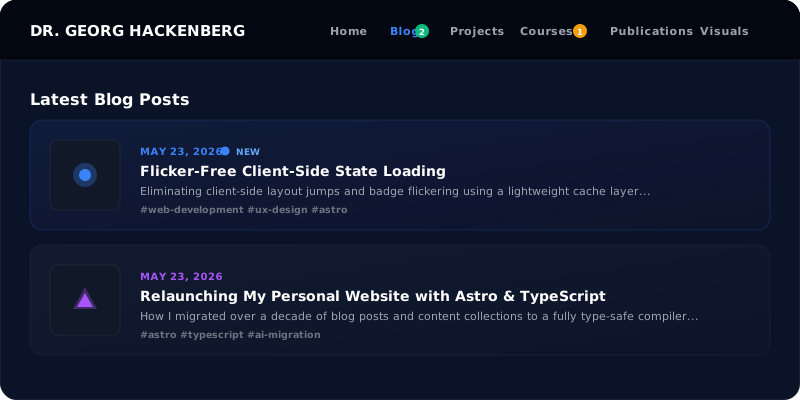
The UI Mockup: Where Indicators Live
We wanted a visual system that instantly guides users. The final interface features two levels of unread notifications:
- Navbar Badges: Colored, rounded numeric counts (matching the section’s accent color) indicating the total number of unread items in that collection.
- Card Indicators: A subtle glowing dot next to the date header on cards representing content that has not yet been visited.
Here is a mockup of the visual interface:
How Do You Prevent Layout Shift When Loading Client-Side State?
To eliminate visual layout flickering (Cumulative Layout Shift) on static websites, client state must be painted synchronously before the first paint cycle. By combining pre-compiled build-time content manifests with inline render-blocking localStorage lookups and background asynchronous delta synchronization, UI badges appear instantly without flash.
The Problem with Traditional Async State Ingestion
A standard approach for client-side state is to load an asynchronous JavaScript script, read localStorage, fetch a manifest of posts, and inject the badges into the DOM.
While simple, this pattern introduces a major UX flaw: Visual Flickering. Because async scripts execute after the DOM is rendered and styled, the user will see the navbar without badges for a split second, followed by a sudden jump as badges and unread dots pop into existence. This layout shift looks unpolished and cheap.
To achieve a flicker-free experience, we designed a decoupled synchronization architecture.
Architectural Trade-offs: Client Notification Strategies
| Architecture Approach | Initial Paint Flicker (CLS) | Server Overhead | Offline & Privacy Support | Code Complexity |
|---|---|---|---|---|
| Server-Rendered DB Query | None (Zero CLS) | High (Requires DB & Auth per request) | Poor (Server dependency) | High (Backend stack needed) |
| Async Client-Side Script | Severe (~150-300ms flash) | Low (Static CDN) | Excellent (Pure browser state) | Very Low |
| Decoupled Cached Manifest | None (Zero CLS) | Zero (Pre-compiled JSON) | Excellent (Local Storage) | Moderate (Inline paint + worker sync) |
Decoupled Architecture: Build-Time meets Client-Time
To make indicators render instantly, we split our system into three layers:
- Build-Time Manifest Generation: A static endpoint compiled during deployment.
- Synchronous Inline Painting: A tiny render-blocking inline script that uses local cache to update the UI before the browser paints.
- Background Asynchronous Syncing: A full-featured module that tracks user navigation, fetches the latest manifest, updates
localStorage, and handles new items.
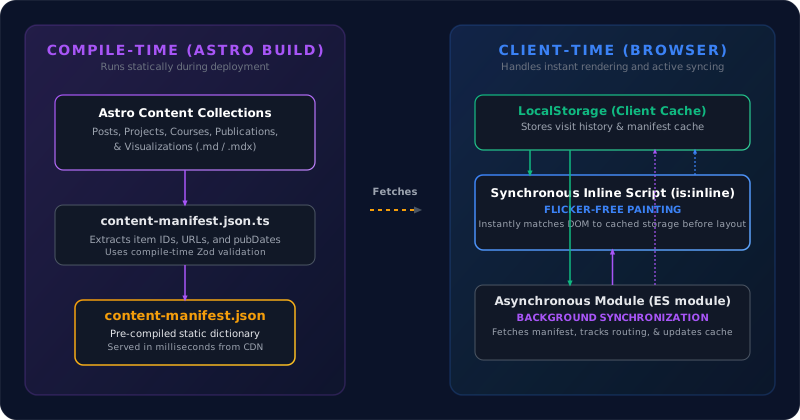
1. Build-Time Content Manifest
First, we created a dynamic endpoint src/pages/content-manifest.json.ts that runs during the Astro build process. It fetches all content collections, extracts their URLs and publication timestamps (validated by Zod schemas), and output a single, pre-compiled static JSON file:
export async function GET() {
  const posts = await getCollection("posts");
  const courses = await getCollection("courses");
  const projects = await getCollection("projects");
  const publications = await getCollection("publications");
  const visualizations = await getCollection("visualizations");

  const manifest = {
    posts: posts.map(p => ({ id: p.id, url: `/posts/${p.id}`, date: parseItemDate(p.id, p.data.pubDate) })),
    courses: courses.map(c => ({ id: c.id, url: `/courses/${c.id}`, date: parseItemDate(c.id, c.data.pubDate) })),
    // ... other collections
  };

  return new Response(JSON.stringify(manifest), {
    headers: { "Content-Type": "application/json" }
  });
}
2. Synchronous Inline Painting (Flicker-Free)
To completely prevent the layout flash, we injected a synchronous, inlined script block (is:inline) right at the bottom of the <body> in our main layout Layout.astro.
Because this script is inlined and simple, it executes synchronously during the initial HTML rendering loop. It reads the user’s notification state and the cached content manifest directly from localStorage, instantly toggling the visibility of .unread-dot and .nav-badge DOM nodes before the browser executes the first paint:
<script is:inline>
  (function() {
    const STORAGE_KEY = 'gh_site_notifications_v1';
    const MANIFEST_CACHE_KEY = 'gh_content_manifest_cache';

    // 1. Read state
    let state = { lastVisitedSections: {}, visitedItems: {} };
    try {
      const stored = localStorage.getItem(STORAGE_KEY);
      if (stored) state = JSON.parse(stored);
    } catch(e) {}

    // 2. Instantly update unread dots
    const unreadDots = document.querySelectorAll('.unread-dot');
    unreadDots.forEach(dot => {
      const rawUrl = dot.getAttribute('data-item-url');
      if (rawUrl) {
        const isVisited = !!state.visitedItems[normalizePath(rawUrl)];
        if (!isVisited) dot.classList.remove('hidden');
      }
    });

    // 3. Instantly update navbar badges using cached manifest
    // ...
  })();
</script>
3. Background Asynchronous Syncing
Once the page is rendered, our primary client-side TypeScript module src/scripts/notifications.ts runs asynchronously in the background. Its job is to:
- Track Page Visits: If the user is viewing
/posts, it updates thelastVisitedSections['posts']timestamp. If they view an article like/posts/my-post, it flags the item URL as visited. - Fetch Manifest: It queries the static
/content-manifest.jsonon the server. - Update Cache: It recalculates the unread item counts using the fresh data, updates any badges if a new post has been published since their last cached visit, and writes the updated manifest back into the
localStoragecache for the next page load.
State and Event Workflows
The sequence diagram below displays the step-by-step workflow of the client state machine when a user triggers a page request:
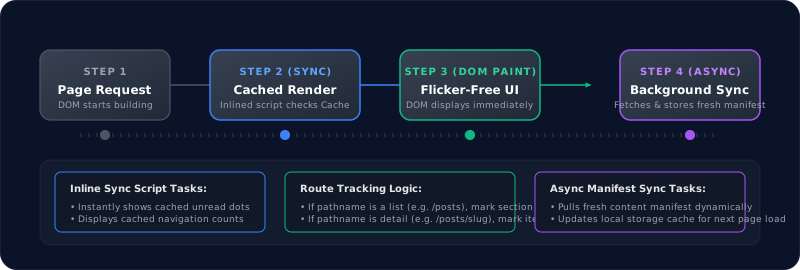
By utilizing the cached manifest cache from the previous session, the client is able to execute Step 2 synchronously. When the background fetch completes in Step 4, if there is a discrepancy (e.g., a new article was published since the user last refreshed), the UI updates smoothly, ensuring they always have accurate, real-time unread counts without sacrificing performance.
Frequently Asked Questions (FAQ)
What causes layout shift when loading client-side badges?
Layout shifts (CLS) occur when asynchronous JavaScript scripts inject HTML elements into the DOM after the browser has already finished rendering and painting the initial page. On static websites, this creates a visible flicker where navigation bars initially render flat, then suddenly shift down or expand as badges appear.
How does localStorage caching prevent visual flickering?
By inlining a tiny, synchronous script block at the very bottom of the document body, the browser executes badge evaluation before the first paint cycle. The script reads the pre-cached unread state from localStorage instantly, ensuring elements render in their correct visual positions without waiting for asynchronous network fetches.
Does this client-side notification architecture require a backend?
No. All collection timestamps and URLs are extracted into a static /content-manifest.json file at build time. The user’s read state is stored completely on their own device via localStorage, guaranteeing full GDPR privacy compliance and zero server infrastructure costs.
Summary of Benefits
This decoupled notification architecture provides several major advantages:
- Zero Cumulative Layout Shift (CLS): The client paint phase always has access to the cached values, meaning badges are shown immediately, preventing layout flickering.
- Static Compilation: The server never has to execute dynamic database queries. The manifest is pre-compiled at build time and served globally via a fast CDN.
- No Database Dependencies: Users are tracked anonymously on their own machines using local storage, keeping the application fast, privacy-friendly, and cost-effective.
Implementing this pattern ensures that static sites feel as reactive and feature-rich as complex single-page apps, while retaining all the speed and security benefits of pre-rendered HTML. For further architectural details on our static stack, see our Astro Relaunch deep dive and explore our topics on Web Performance.