The YouTube video is meant to demonstrate the simulation prototype both in Mozilla Firefox and Microsoft Internet Explorer. The two version differ a little in that Microsoft IE additionally display the velocity of each ball as well as collision debug information. It is however possible to make both versions identical.
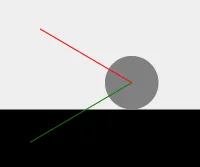
In terms of the logic behind the scenes there are two interesting cases to highlight: (1) The ball bouncing back from the ground and (2) two balls colliding with each other. The bounce logic first checks if the position of the ball and its radius cause a collision with the ground. If that is the case then the velocity of the ball is reflected across the horizontal ground line and due to friction the amount is dampened. This phenomena is depicted in the following picture series:
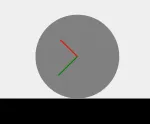
As the ball reaches the ground plane, the vertical velocity vector is inverted and dampened at the moment of impact:
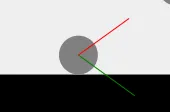
Immediately after the rebound, the ball ascends along the reflected trajectory with reduced kinetic energy:
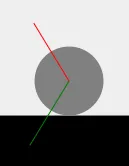
Finally, gravity decelerates the upward motion until the ball reaches its lower apex and begins the next cycle:
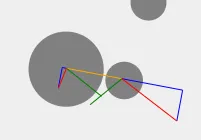
The behavior in case of collisions between two separate balls is a little more complex than that. If two balls collide the connecting line between the centers of the balls (orange line in the following picture series) defines a local coordinate system. Now the velocities of both balls have to be converted into this local coordinate system. The reason is that this conversion reveals (1) the velocity component that is influenced by the collision and (2) the velocity component that is independent. The first component is parallel to the orange line, the second component is orthogonal. Next the influenced component is changed according to the laws of impulse, i.e. including the relative masses and velocities of the balls. And finally the first and the second component have to be added again to obtain the new velocity of each ball. The effect of this procedure is visualized in the following picture series. Blue lines depict the components of the new velocities.
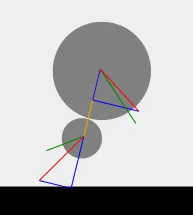
At the exact point of contact, the velocity vectors are projected onto the orange collision axis and its orthogonal tangent:
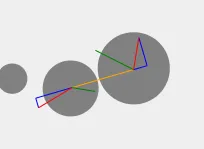
After exchanging momentum along the collision axis, the recombined blue velocity vectors guide both balls along their new diverging paths:
If I find the time I will also make sure to compile a package of the prototype for download. So far it is just a bunch of files lying around on the hard disk. In particular there are also dependencies on proprietary JavaScript libraries which have to be resolved properly. Nevertheless I hope this is something of interest for you.